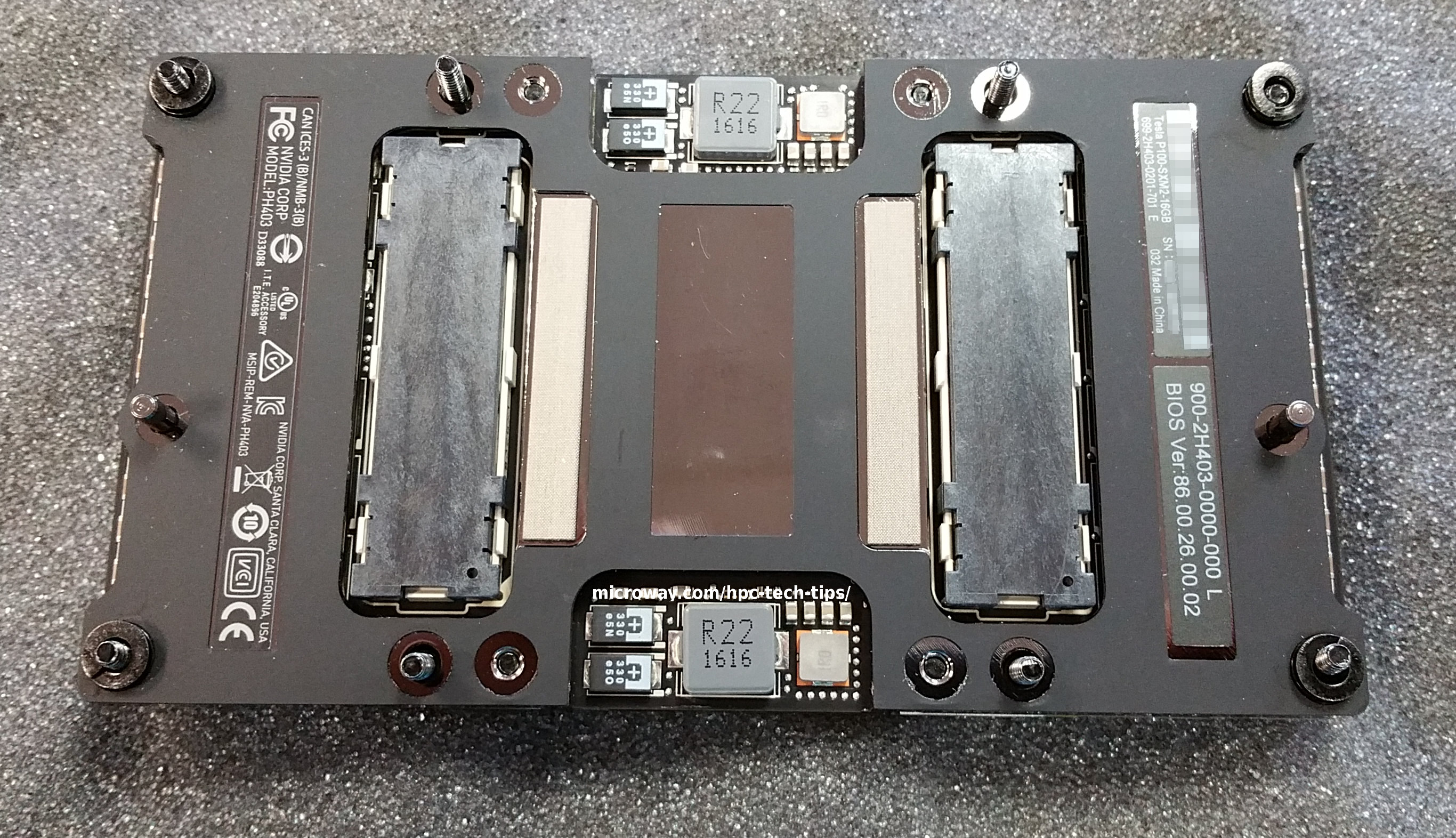
The NVIDIA Tesla P100 NVLink GPUs are a big advancement. For the first time, the GPU is stepping outside the traditional “add in card” design. No longer tied to the fixed specifications of PCI-Express cards, NVIDIA’s engineers have designed a new form factor that best suits the needs of the GPU. With their SXM2 design, NVIDIA can run GPUs to their full potential.
One of the biggest changes this allows is the NVLink interconnect, which allows GPUs to operate beyond the restrictions of the PCI-Express bus. Instead, the GPUs communicate with one another over this high-speed link. Additionally, these new “Pascal” architecture GPUs bring improvements including higher performance, faster connectivity, and more flexibility for users & programmers.
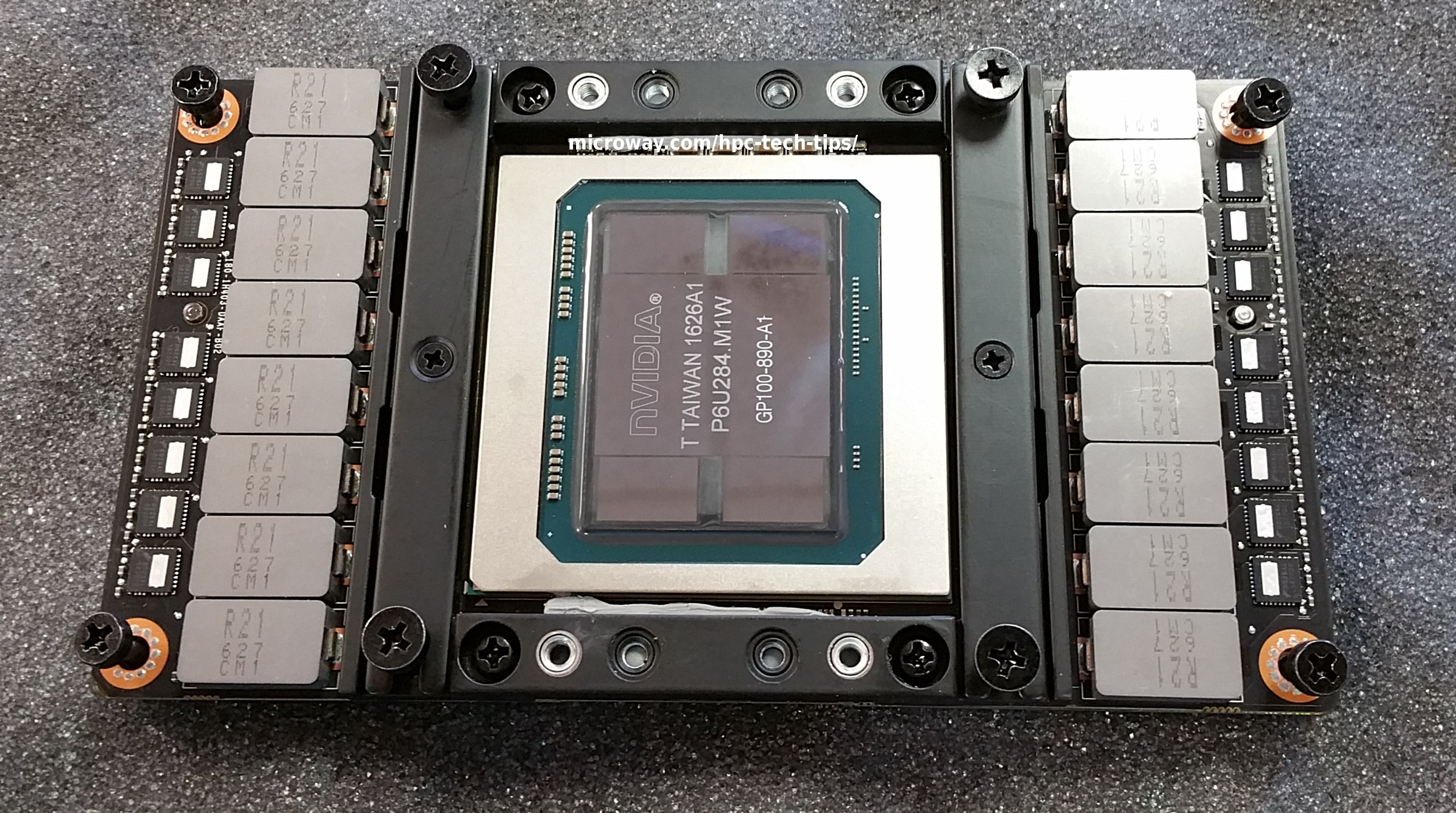
There is variety in the new line-up of GPU products. For the Tesla P100 GPU model, there are three separate paths to be considered:
- Tesla P100 PCI-E GPUs
- Tesla P100 NVLink GPUs (with PCI-E connectivity to the host) (this post)
- Tesla P100 NVLink GPUs (with NVLink connectivity to the host)
Highlights of the new Tesla P100 NVLink GPUs include:
- Up to 5.3 TFLOPS double- and 10.6 TFLOPS single-precision floating-point performance
- 16GB of on-die HBM2 CoWoS GPU memory, with bandwidths up to 732GB/s
- 80GB/s NVLink between GPUs boosts bandwidth between the Tesla P100 GPUs
- High-speed, on-die GPU memory provides a 3X improvement over older GPUs
- Pascal Unified Memory allows applications to directly access the memory of all GPUs and all of system memory
Improved Data Transfer Speeds
The NVLink connection on Tesla P100 GPUs has a theoretical peak throughput of 80GB/s (160GB/s bi-directional). However, that connectivity is only between GPUs. The GPUs still communicate via PCI-Express when transferring data to and from the host (via PCI-E x16 generation 3.0). The high-speed NVLink connection is only for data transfers directly between the GPUs.
Device <-> Device Tesla P100 NVLink Performance
Below is a section of output from NVIDIA’s GPU peer-to-peer (P2P) utility, which is included with CUDA 8.0. The results summarize the throughput (in gigabytes per second) and latency (in microseconds) when sending messages between any pair of GPUs.
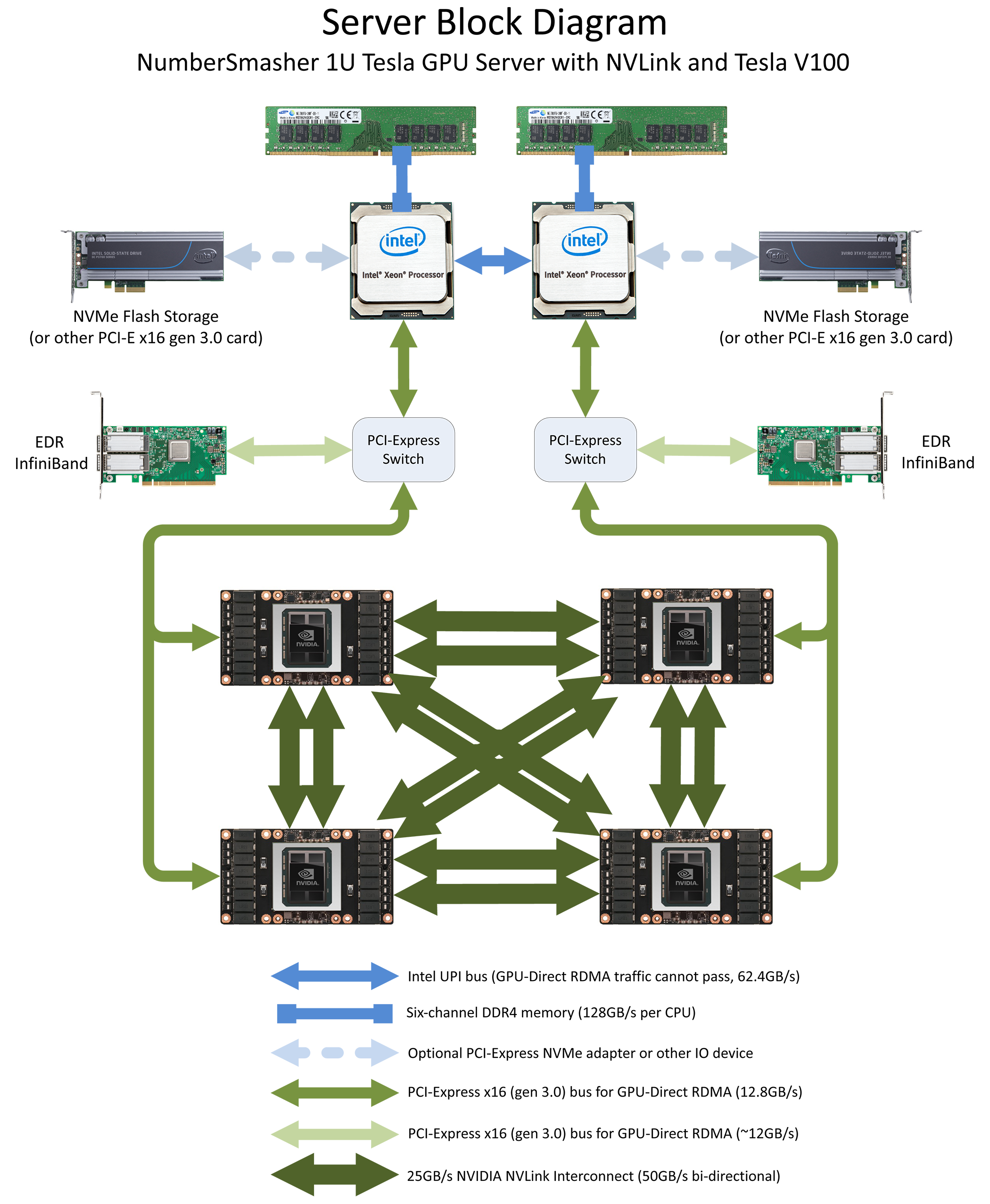
It’s important to understand that the test below was run on a system with four Tesla GPUs. On each GPU, the available 80GB/s bandwidth was divided up so that connections could be made to the three other GPUs. The links are divided such that each GPU has two 20GB/s links and one 40GB/s link (see diagram below).
[P2P (Peer-to-Peer) GPU Bandwidth Latency Test]
Device: 0, Tesla P100-SXM2-16GB, pciBusID: 6, pciDeviceID: 0, pciDomainID:0
Device: 1, Tesla P100-SXM2-16GB, pciBusID: 7, pciDeviceID: 0, pciDomainID:0
Device: 2, Tesla P100-SXM2-16GB, pciBusID: 84, pciDeviceID: 0, pciDomainID:0
Device: 3, Tesla P100-SXM2-16GB, pciBusID: 85, pciDeviceID: 0, pciDomainID:0

...

Unidirectional P2P=Enabled Bandwidth Matrix (GB/s)
   D\D     0      1      2      3
     0 449.69  18.45  18.45  36.72
     1  18.44 450.92  36.70  18.44
     2  18.45  36.70 450.37  18.44
     3  36.71  18.44  18.44 447.34

...

P2P=Enabled Latency Matrix (us)
   D\D     0      1      2      3
     0   3.66   9.25   9.31   9.67
     1   9.49   3.65  10.04   9.05
     2   9.85  10.13   3.13   9.79
     3  10.06  11.41   9.97   3.54
As the results show, a 20GB/s Tesla P100 NVLink will provide ~18GB/s in practice. A 40GB/s Tesla P100 NVLink will provide ~36GB/s. Latency between GPUs is 9~10 microseconds. The results were gathered on our 1U NumberSmasher Server with four Tesla P100 NVLink GPUs, which is also available in our Test Drive cluster. The architectural design of this particular platform is:
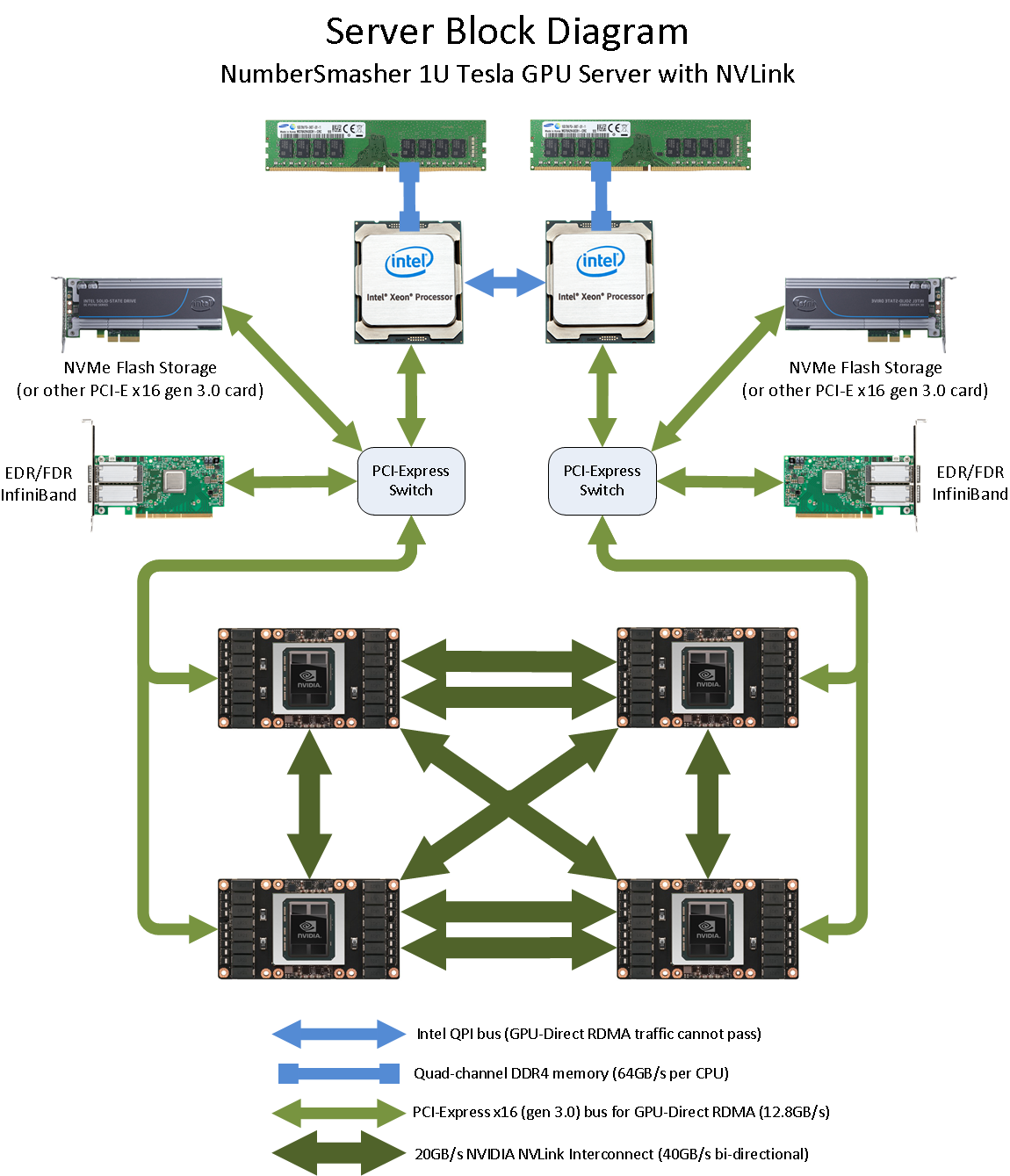
Host <-> Device Performance
Transfers between system memory and the GPU are still via PCI-Express and will perform similarly to previous-generation “Kepler” and “Maxwell” GPUs. With Tesla P100, you will be able to achieve transfers up to ~12.8GB/s between the host and the GPU:
[root@node2 ~]# ./bandwidthTest --memory=pinned --device=0
[CUDA Bandwidth Test] - Starting...
Running on...

 Device 0: Tesla P100-SXM2-16GB
 Quick Mode

 Host to Device Bandwidth, 1 Device(s)
 PINNED Memory Transfers
   Transfer Size (Bytes)	Bandwidth(MB/s)
   33554432			11463.7

 Device to Host Bandwidth, 1 Device(s)
 PINNED Memory Transfers
   Transfer Size (Bytes)	Bandwidth(MB/s)
   33554432			12868.0

 Device to Device Bandwidth, 1 Device(s)
 PINNED Memory Transfers
   Transfer Size (Bytes)	Bandwidth(MB/s)
   33554432			446271.0

Result = PASS
Technical Details
Below are the technical details reported by nvidia-smi. Note that “Pascal” Tesla P100 GPUs now include fully integrated memory ECC support that is always enabled (memory performance in previous generations could be improved by disabling ECC).
[root@node2 ~]# nvidia-smi -a -i 0

==============NVSMI LOG==============

Timestamp                           : Tue Dec  6 16:30:58 2016
Driver Version                      : 367.48

Attached GPUs                       : 1
GPU 0000:06:00.0
    Product Name                    : Tesla P100-SXM2-16GB
    Product Brand                   : Tesla
    Display Mode                    : Disabled
    Display Active                  : Disabled
    Persistence Mode                : Enabled
    Accounting Mode                 : Enabled
    Accounting Mode Buffer Size     : 1920
    Driver Model
        Current                     : N/A
        Pending                     : N/A
    Serial Number                   : 032311609xxxx
    GPU UUID                        : GPU-70ba5857-9613-1213-c5f5-3b201233xxxx
    Minor Number                    : 0
    VBIOS Version                   : 86.00.26.00.02
    MultiGPU Board                  : No
    Board ID                        : 0x600
    GPU Part Number                 : 900-2H403-0000-000
    Inforom Version
        Image Version               : H403.0201.00.04
        OEM Object                  : 1.1
        ECC Object                  : 4.1
        Power Management Object     : N/A
    GPU Operation Mode
        Current                     : N/A
        Pending                     : N/A
    GPU Virtualization Mode
        Virtualization mode         : None
    PCI
        Bus                         : 0x06
        Device                      : 0x00
        Domain                      : 0x0000
        Device Id                   : 0x15F910DE
        Bus Id                      : 0000:06:00.0
        Sub System Id               : 0x116B10DE
        GPU Link Info
            PCIe Generation
                Max                 : 3
                Current             : 3
            Link Width
                Max                 : 16x
                Current             : 16x
        Bridge Chip
            Type                    : N/A
            Firmware                : N/A
        Replays since reset         : 0
        Tx Throughput               : 0 KB/s
        Rx Throughput               : 0 KB/s
    Fan Speed                       : N/A
    Performance State               : P0
    Clocks Throttle Reasons
        Idle                        : Active
        Applications Clocks Setting : Not Active
        SW Power Cap                : Not Active
        HW Slowdown                 : Not Active
        Sync Boost                  : Not Active
        Unknown                     : Not Active
    FB Memory Usage
        Total                       : 16276 MiB
        Used                        : 0 MiB
        Free                        : 16276 MiB
    BAR1 Memory Usage
        Total                       : 16384 MiB
        Used                        : 2 MiB
        Free                        : 16382 MiB
    Compute Mode                    : Default
    Utilization
        Gpu                         : 0 %
        Memory                      : 0 %
        Encoder                     : 0 %
        Decoder                     : 0 %
    Ecc Mode
        Current                     : Enabled
        Pending                     : Enabled
    ECC Errors
        Volatile
            Single Bit
                Device Memory       : 0
                Register File       : 0
                L1 Cache            : N/A
                L2 Cache            : 0
                Texture Memory      : 0
                Texture Shared      : 0
                Total               : 0
            Double Bit
                Device Memory       : 0
                Register File       : 0
                L1 Cache            : N/A
                L2 Cache            : 0
                Texture Memory      : 0
                Texture Shared      : 0
                Total               : 0
        Aggregate
            Single Bit
                Device Memory       : 0
                Register File       : 0
                L1 Cache            : N/A
                L2 Cache            : 0
                Texture Memory      : 0
                Texture Shared      : 0
                Total               : 0
            Double Bit
                Device Memory       : 0
                Register File       : 0
                L1 Cache            : N/A
                L2 Cache            : 0
                Texture Memory      : 0
                Texture Shared      : 0
                Total               : 0
    Retired Pages
        Single Bit ECC              : 0
        Double Bit ECC              : 0
        Pending                     : No
    Temperature
        GPU Current Temp            : 40 C
        GPU Shutdown Temp           : 85 C
        GPU Slowdown Temp           : 82 C
    Power Readings
        Power Management            : Supported
        Power Draw                  : 34.89 W
        Power Limit                 : 300.00 W
        Default Power Limit         : 300.00 W
        Enforced Power Limit        : 300.00 W
        Min Power Limit             : 150.00 W
        Max Power Limit             : 300.00 W
    Clocks
        Graphics                    : 405 MHz
        SM                          : 405 MHz
        Memory                      : 715 MHz
        Video                       : 835 MHz
    Applications Clocks
        Graphics                    : 1480 MHz
        Memory                      : 715 MHz
    Default Applications Clocks
        Graphics                    : 1328 MHz
        Memory                      : 715 MHz
    Max Clocks
        Graphics                    : 1480 MHz
        SM                          : 1480 MHz
        Memory                      : 715 MHz
        Video                       : 1480 MHz
    Clock Policy
        Auto Boost                  : N/A
        Auto Boost Default          : N/A
    Processes                       : None
The latest NVIDIA GPU architectures support large numbers of clock speeds, as well as automated boosting of the clock speed (when power and thermals allow). Administrators can also set specific power consumption limits and monitor the clock speeds (including explanations for any reasons the clocks are running at a lower speed).
[root@node2 ~]# nvidia-smi -q -d SUPPORTED_CLOCKS -i 0

==============NVSMI LOG==============

Timestamp                           : Tue Dec  6 16:39:20 2016
Driver Version                      : 367.48

Attached GPUs                       : 4
GPU 0000:06:00.0
    Supported Clocks
        Memory                      : 715 MHz
            Graphics                : 1480 MHz
            Graphics                : 1468 MHz
            Graphics                : 1455 MHz
            Graphics                : 1442 MHz
            Graphics                : 1430 MHz
            Graphics                : 1417 MHz
            Graphics                : 1404 MHz
            Graphics                : 1392 MHz
            Graphics                : 1379 MHz
            Graphics                : 1366 MHz
            Graphics                : 1354 MHz
            Graphics                : 1341 MHz
            Graphics                : 1328 MHz
            Graphics                : 1316 MHz
            Graphics                : 1303 MHz
            Graphics                : 1290 MHz
            Graphics                : 1278 MHz
            Graphics                : 1265 MHz
            Graphics                : 1252 MHz
            Graphics                : 1240 MHz
            Graphics                : 1227 MHz
            Graphics                : 1215 MHz
            Graphics                : 1202 MHz
            Graphics                : 1189 MHz
            Graphics                : 1177 MHz
            Graphics                : 1164 MHz
            Graphics                : 1151 MHz
            Graphics                : 1139 MHz
            Graphics                : 1126 MHz
            Graphics                : 1113 MHz
            Graphics                : 1101 MHz
            Graphics                : 1088 MHz
            Graphics                : 1075 MHz
            Graphics                : 1063 MHz
            Graphics                : 1050 MHz
            Graphics                : 1037 MHz
            Graphics                : 1025 MHz
            Graphics                : 1012 MHz
NVIDIA deviceQuery on Tesla P100 NVLink 16GB GPU
Each new GPU generation brings tweaks to the design. The output below, from the CUDA 8.0 SDK samples, shows additional details of the architecture and capabilities of the “Pascal” Tesla P100 NVLink GPU accelerators. Take note of the new Compute Capability 6.0, which is what you’ll want to target if you’re compiling your own CUDA code.
deviceQuery Starting...

 CUDA Device Query (Runtime API) version (CUDART static linking)

Detected 4 CUDA Capable device(s)

Device 0: "Tesla P100-SXM2-16GB"
  CUDA Driver Version / Runtime Version          8.0 / 8.0
  CUDA Capability Major/Minor version number:    6.0
  Total amount of global memory:                 16276 MBytes (17066885120 bytes)
  (56) Multiprocessors, ( 64) CUDA Cores/MP:     3584 CUDA Cores
  GPU Max Clock rate:                            405 MHz (0.41 GHz)
  Memory Clock rate:                             715 Mhz
  Memory Bus Width:                              4096-bit
  L2 Cache Size:                                 4194304 bytes
  Maximum Texture Dimension Size (x,y,z)         1D=(131072), 2D=(131072, 65536), 3D=(16384, 16384, 16384)
  Maximum Layered 1D Texture Size, (num) layers  1D=(32768), 2048 layers
  Maximum Layered 2D Texture Size, (num) layers  2D=(32768, 32768), 2048 layers
  Total amount of constant memory:               65536 bytes
  Total amount of shared memory per block:       49152 bytes
  Total number of registers available per block: 65536
  Warp size:                                     32
  Maximum number of threads per multiprocessor:  2048
  Maximum number of threads per block:           1024
  Max dimension size of a thread block (x,y,z): (1024, 1024, 64)
  Max dimension size of a grid size    (x,y,z): (2147483647, 65535, 65535)
  Maximum memory pitch:                          2147483647 bytes
  Texture alignment:                             512 bytes
  Concurrent copy and kernel execution:          Yes with 2 copy engine(s)
  Run time limit on kernels:                     No
  Integrated GPU sharing Host Memory:            No
  Support host page-locked memory mapping:       Yes
  Alignment requirement for Surfaces:            Yes
  Device has ECC support:                        Enabled
  Device supports Unified Addressing (UVA):      Yes
  Device PCI Domain ID / Bus ID / location ID:   0 / 6 / 0
  Compute Mode:
     < Default (multiple host threads can use ::cudaSetDevice() with device simultaneously) >

  [...]

> Peer access from Tesla P100-SXM2-16GB (GPU0) -> Tesla P100-SXM2-16GB (GPU1) : Yes
> Peer access from Tesla P100-SXM2-16GB (GPU0) -> Tesla P100-SXM2-16GB (GPU2) : Yes
> Peer access from Tesla P100-SXM2-16GB (GPU0) -> Tesla P100-SXM2-16GB (GPU3) : Yes
> Peer access from Tesla P100-SXM2-16GB (GPU1) -> Tesla P100-SXM2-16GB (GPU0) : Yes
> Peer access from Tesla P100-SXM2-16GB (GPU1) -> Tesla P100-SXM2-16GB (GPU2) : Yes
> Peer access from Tesla P100-SXM2-16GB (GPU1) -> Tesla P100-SXM2-16GB (GPU3) : Yes
> Peer access from Tesla P100-SXM2-16GB (GPU2) -> Tesla P100-SXM2-16GB (GPU0) : Yes
> Peer access from Tesla P100-SXM2-16GB (GPU2) -> Tesla P100-SXM2-16GB (GPU1) : Yes
> Peer access from Tesla P100-SXM2-16GB (GPU2) -> Tesla P100-SXM2-16GB (GPU3) : Yes
> Peer access from Tesla P100-SXM2-16GB (GPU3) -> Tesla P100-SXM2-16GB (GPU0) : Yes
> Peer access from Tesla P100-SXM2-16GB (GPU3) -> Tesla P100-SXM2-16GB (GPU1) : Yes
> Peer access from Tesla P100-SXM2-16GB (GPU3) -> Tesla P100-SXM2-16GB (GPU2) : Yes

deviceQuery, CUDA Driver = CUDART, CUDA Driver Version = 8.0, CUDA Runtime Version = 8.0, NumDevs = 4, Device0 = Tesla P100-SXM2-16GB,
Device1 = Tesla P100-SXM2-16GB, Device2 = Tesla P100-SXM2-16GB, Device3 = Tesla P100-SXM2-16GB
Result = PASS
Additional Information on Tesla P100 NVLink GPUs
To learn more about the available P100 GPUs and to compare with other versions of the Tesla product line, please review our “Pascal” Tesla GPU knowledge center article:
If you’re thinking about using GPUs for the first time, please consider getting in touch with us. We’ve been implementing GPU-accelerated systems for nearly a decade and have the expertise to help make your project a success!
Due to their novel design, Tesla P100 NVLink GPUs cannot be installed into existing GPU systems. Platforms with the NVLink-connected SXM2 sockets are required. For several options, have a look at our list of P100 GPU-accelerated systems. You may also wish to review our post on PCI-Express connected Tesla P100 GPUs.